
Google Search Console Social Media Integration: Everything You Need to Know About Platform Properties
If you manage a website, you already know Google Search Console as the tool that shows you how your pages perform in Search — impressions, clicks, queries, the whole picture. But that picture used to stop at your own domain. If your brand or your content also lived on Instagram, TikTok, X, or YouTube, Search Console had nothing to say about it.
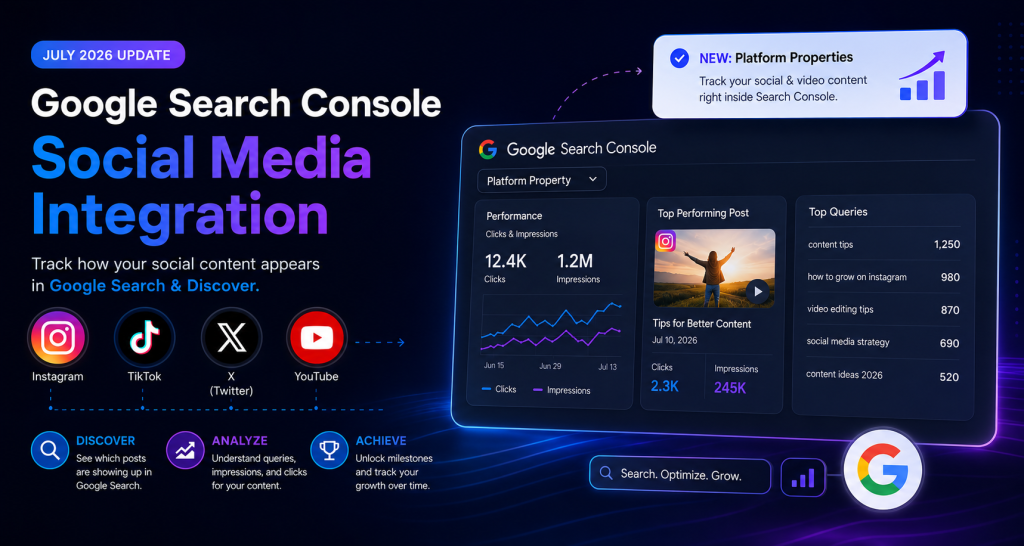
That changed in July 2026. Google rolled out Google Search Console social media integration through a new property type called “platform properties,” and it’s arguably the biggest shift in Search Console’s scope since it launched. For the first time, you can connect your social and video accounts directly to Search Console and see exactly how those posts are surfacing — and performing — in Google Search and Discover.
Here’s everything you need to know about this Google Search Console social media integration before you set it up yourself.
What Are Platform Properties, Exactly?
Platform properties are a new kind of Search Console property built specifically for content you publish off your own website — on the major social platforms. Instead of verifying a domain, you verify ownership of a social account, and Search Console starts tracking how posts from that account appear in Google Search results. This is the core mechanic behind Google Search Console social media integration: pulling social account data into the exact same reporting environment your website already uses.
Right now, four platforms are supported:
- TikTok
- X (formerly Twitter)
- YouTube
The rollout builds on a smaller, quieter experiment Google ran back in December 2025 that first tested pulling social data into Search Console. Platform properties is the full, official version of that idea — and the moment Google Search Console social media integration went from experiment to permanent feature.
Why Google Search Console Social Media Integration Matters
For years, social media performance and SEO performance lived in two completely separate worlds. If you’re already tracking your organic performance through our technical SEO audit checklist, this update is the natural next layer on top of that work. Your social team tracked likes, shares, and platform-native engagement. Your SEO team tracked domain traffic in Search Console. Neither side had visibility into how social content was actually showing up in Google’s own search results — which, for many brands and creators, is a meaningful (and growing) source of discovery.
Platform properties closes that gap. A few reasons this is a genuinely useful update:
- No website required. Previously, Search Console only worked if you owned and verified a domain. Now, thanks to Google Search Console social media integration, creators who publish exclusively on social or video platforms — with no personal site at all — can set up a property and start seeing their Search visibility for the first time.
- One reporting environment. Instead of guessing whether a TikTok or Instagram post is driving any search traffic, you get the same style of query-level, click-level data you’re used to seeing for a website.
- A new signal for content strategy. Knowing which social posts are actually generating Google Search impressions helps you double down on the topics and formats that are earning organic visibility — not just social engagement.
The Three Reports You’ll Get
Once a platform property is verified, Search Console populates three reports for it as part of Google Search Console social media integration, mirroring the structure of its existing website reports:
- Performance report — Total clicks, impressions, and related metrics, with filtering and sorting so you can identify which individual posts and search queries are driving traffic.
- Insights report — Recent traffic trends, your top-performing posts, and how audiences are discovering your account through Google.
- Achievements report — Growth milestones, like crossing a new click threshold from Google Search within a rolling 28-day period.
How to Set Up Google Search Console Social Media Integration
Google detailed the rollout in its own Search Central announcement, and getting a platform property connected only takes a few steps:
- Open Google Search Console.
- Click the property selector dropdown and choose Add property (or head to the verification page directly).
- Select the platform you want to connect: Instagram, TikTok, X, or YouTube.
- Follow the on-screen prompts to securely authorize and verify the connection. You’ll need appropriate ownership or admin access to the account.
- Repeat for any additional accounts you want to track.
A couple of things worth knowing:
- After verification, it can take a few days for performance data to start appearing.
- If your login session expires or the connection drops, the property pauses until you reconnect — so it’s worth checking back periodically to make sure everything’s still linked.
- For troubleshooting and eligibility requirements, Google maintains an official help page on platform properties that’s worth bookmarking.
A Quick Distinction: Platform Properties vs. Search Profiles
It’s easy to confuse this with Search profiles, a separate feature Google introduced back in June 2026. Search profiles are public-facing pages that consolidate a creator’s content for their followers — think of it as a shareable hub.
Platform properties are the opposite of public-facing. They’re an internal analytics view for you, showing how your posts perform in Search — not a page you show off to an audience. Google Search Console social media integration and Search profiles both push in the same general direction (bringing social and Search closer together), but they’re two different tools solving two different problems.
What This Means for Your Content Strategy Going Forward
The real value of Google Search Console social media integration isn’t just the novelty of new data — it’s what you can do with it. Instead of planning content around “what should we post next,” teams can start asking more precise questions:
- Which of our existing posts are already generating Google Search impressions?
- What queries are actually leading people to our social content?
- Is our YouTube content earning search visibility that our website content isn’t?
That’s a genuinely new lens for both SEO and social teams, and it’s part of a broader pattern: Google is steadily blurring the line between “your website” and “everywhere else you publish.” If you’d like help turning this data into an actual content plan, our social media content strategy services can walk you through it.
The Bottom Line
If you or your brand has any real presence on Instagram, TikTok, X, or YouTube, Google Search Console social media integration is worth setting up now. It costs nothing, takes a few minutes, and gives you visibility you simply couldn’t get before — a direct view into how your social content performs on the world’s biggest search engine, not just inside each platform’s own walled-garden analytics.
For further reading, Search Engine Journal’s coverage of the launch is a good next stop.